Gallery
The Gallery stores design photos organised by garment type. Use it to save reference photos and show customers what you've made.
Tap Gallery in the bottom navigation bar.
How the Gallery is Organised
Photos are grouped into folders by garment type. The default folders match the garment types in your shop (e.g., Churidar, Dress, Frock, Jumpsuit, Kurti, Palazzo, Saree Blouse).
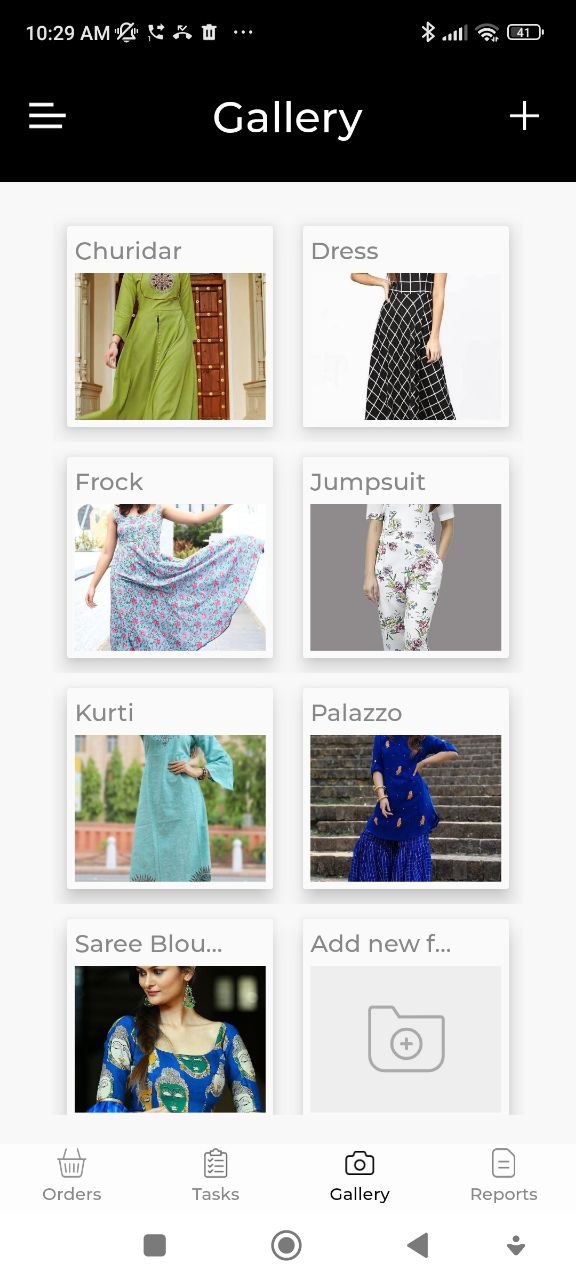
Add a New Folder
- Tap Add New Folder from the Gallery screen.
- Enter a folder name.
- Tap Save.
Add Photos to a Folder
- Open the folder.
- Tap + or Add Photo.
- Choose a photo from your gallery or take a new one with the camera.
Browse and Share
Open any folder to browse the photos inside. Tap a photo to view it full-size. Use the share button on a photo to send it via WhatsApp or any other app.
tip
Keep the Gallery up to date with your best work — it's easy to show customers design options directly from the app during a measurement appointment.